What you'll learn
1. In Programming & Software (Type Definitions)
In languages like TypeScript, "typings" refer to type definitions or declarations. They describe the data types (e.g., strings, numbers, objects) a function or variable expects.  Stack Overflow
+4
- Purpose: They help catch bugs and provide auto-complete in code editors.
- Example: Installing typings via DefinitelyTyped for a JavaScript library so your code editor understands it. Stack Overflow
2. General Usage (Keyboarding)
"Typing" (the singular form of typings) is the process of inputting text, numbers, or symbols by pressing keys on a computer, phone, or typewriter.  Wikipedia
- Example: A job requirement demanding a typing speed of 60 words per minute (WPM).
 Cambridge Dictionary
 - +1
3. Biology & Medicine
In medical and biological contexts, it means identifying or categorizing something based on its characteristics (e.g., blood typing or tissue
Show More
Course Syllabus
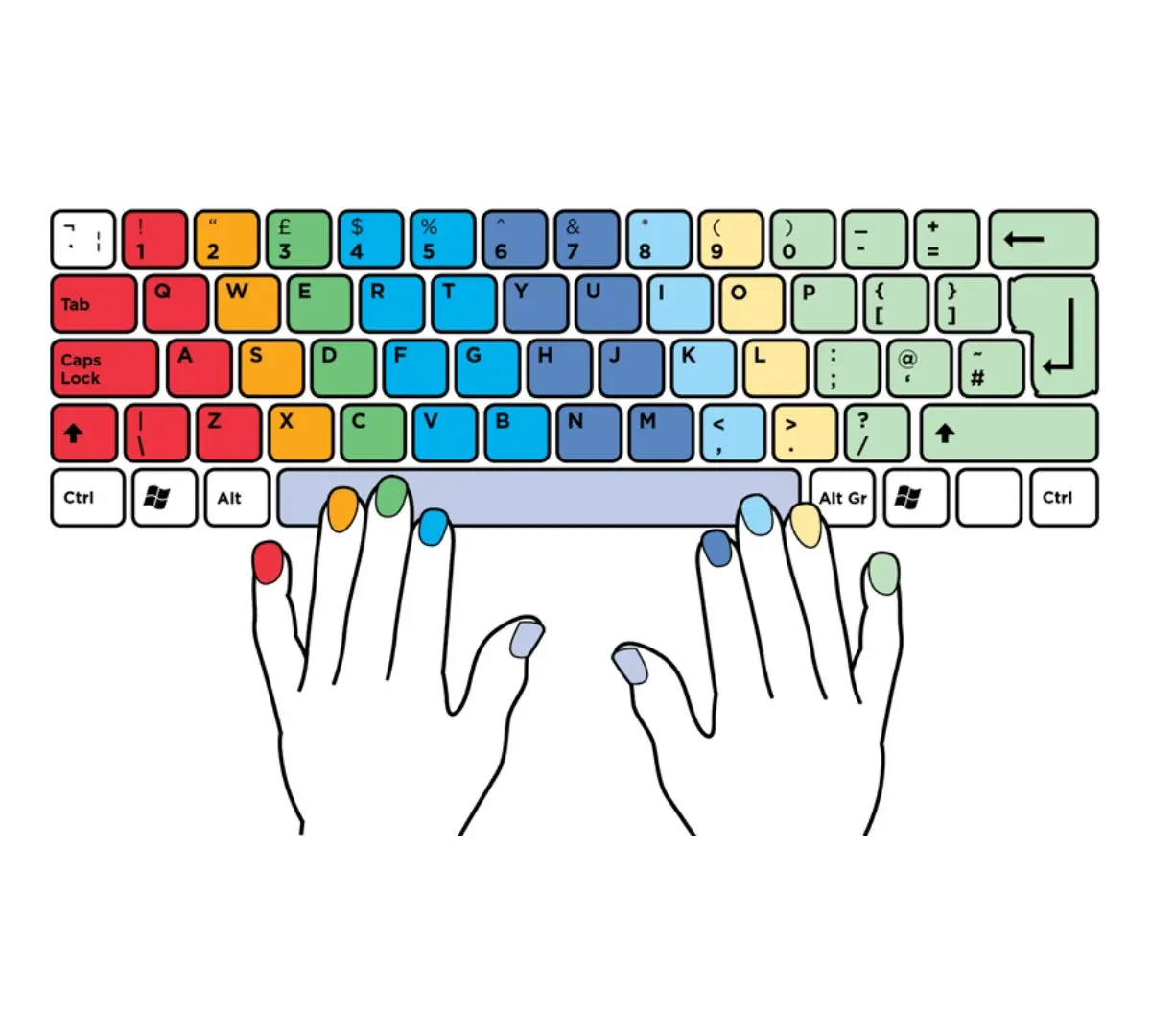
A typing syllabus helps you master touch-typing, systematically building your muscle memory to increase speed and accuracy without looking at the keyboard.
Phase 1: Keyboard Familiarity & Basics (Days 1–10)
- Posture & Ergonomics: Proper desk seating, monitor height, wrist positioning, and correct finger curvature.
- The Home Row: Mastering keys like
A S D F for your left hand and ; L K J for your right. - Touch Typing Concept: Building the habit of typing by muscle memory rather than sight.
 Sarva Computer Education Franchise
 - +4
Phase 2: Expanding the Reach (Days 11–20)
- Top Row Mastery: Learning letters mapped to the upper section of the keyboard (e.g.,
Q W E R T, Y U I O P). - Bottom Row Keys: Practicing the lower rows with both hands.
- Shift Key Execution: Integrating shift keys for capitalization, alongside basic punctuation characters (e.g., commas, periods, question marks).
 Sarva Computer Education Franchise
 - +4
Phase 3: Speed, Accuracy, and Punctuation (Days 21–40)
- Common Words and Phrases: Transitioning from individual letters to continuous, common English words.
- Numeric Keypad: Practicing the
10-key method for rapid numeric and data entry. - Speed Drills: Hitting targets of

- to
- Words Per Minute (WPM) through timed 60-second passages.Sarva Computer Education Franchise
- +4
Phase 4: Formatting & Document Processing (Days 41–60)
- Letter & Email Formatting: Learning proper business letter formatting, curriculum vitae (CV) layouts, and margin spacing.
- Final Assessment: Timed mock tests to certify professional accuracy rates. Sarva Computer Education Franchise
- +1
Best Tools & Practice Tips
- Daily Practice: Dedicate 15 to 30 minutes a day to achieve fluency in 2–3 months.
- Platforms: Test and improve your WPM using built-in platforms like Typing.com or Typing Master.

 Bestseller